For supervisors.
Your trainee keeps the record in Accrue. You review one week at a time and sign it on their screen. You need no account, and there is nothing to install.
It takes a few minutes a week, and it costs you nothing. The trainee pays for their own plan.
What you are asked to do.
Your trainee opens the week.
They prepare a weekly summary on their phone or in the web app and hand it to you. Each summary covers one week at one site, under one supervisor, for one set of requirements.
You review it.
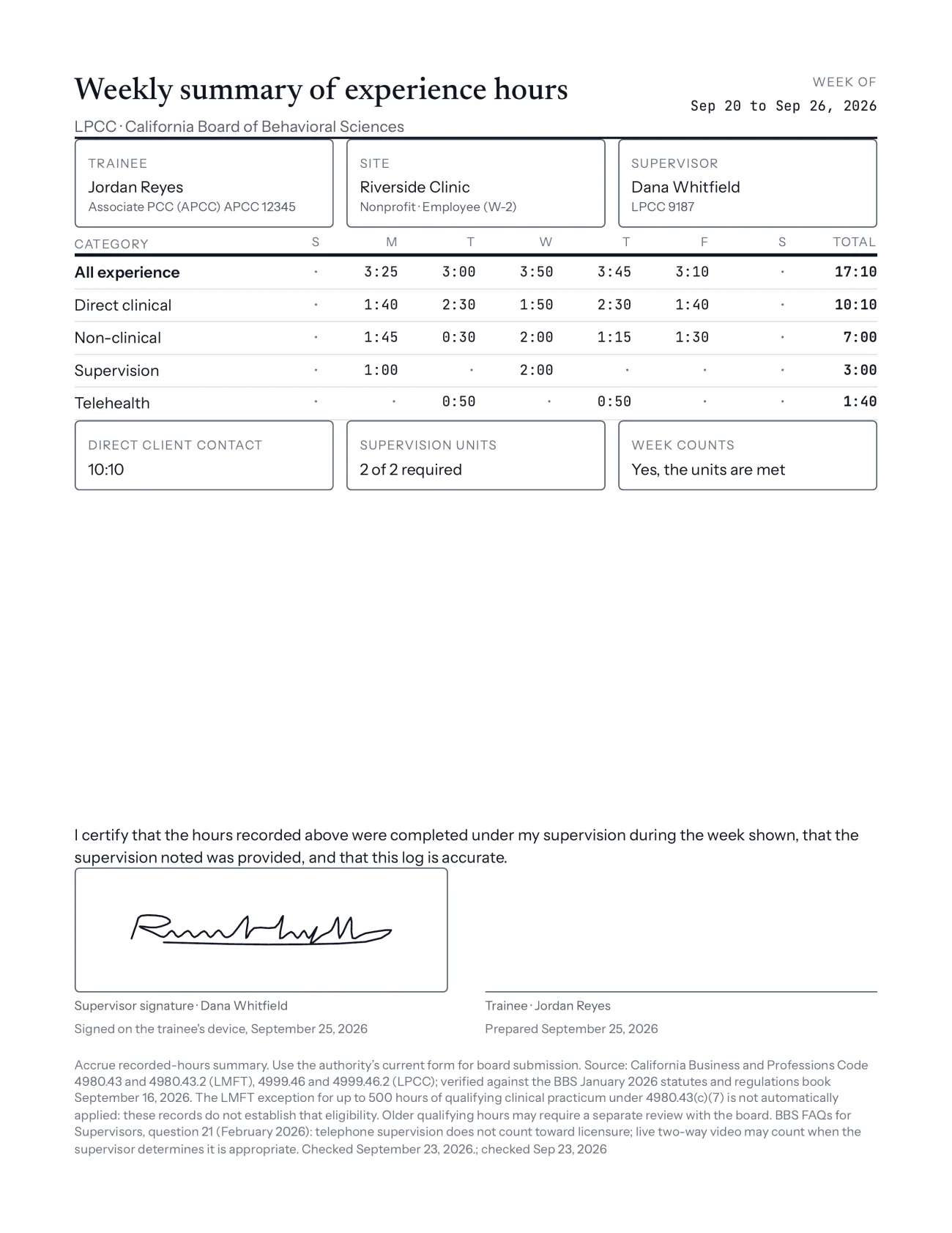
The summary lists hours by day and category, direct client contact, the supervision recorded, and whether the week meets that board’s or program’s supervision requirement.
You type your name and sign.
You sign on the trainee’s screen. The signature and the date are saved with the trainee’s record, and the signed summary can be saved or printed as a PDF.
If something in the week looks wrong, ask the trainee to correct the entry and prepare the summary again before you sign.
What your signature covers.
One week, as recorded.
The summary carries this statement above your signature: “I certify that the hours recorded above were completed under my supervision during the week shown, that the supervision noted was provided, and that this log is accurate.”
A signed week stays as you signed it.
If the trainee changes an entry afterward, Accrue keeps the signed version and marks that it differs from the current record.
Supervision comes first.
Accrue may hold a week back from signing until it meets the supervision requirement of the board or program it is counted under.
It does not replace a board’s form.
A signature in Accrue does not replace a board’s own forms or submission process. Where Accrue fills a board form from the record, such as California’s weekly log, check every field against the board’s current form before it is filed.
Accrue is a record-keeping aid. It counts hours under each board’s or program’s published rule and cites the rule. The board, school or program decides whether it accepts the hours.
Questions supervisors ask.
Do I need an account or the app?
No. Your trainee has the account. You review and sign on their phone or in their browser.
Can I sign from my own computer?
Not today. Signing happens on the trainee’s device. Signing by an emailed link is part of Accrue Fieldwork, a separate workspace for training programs that is in limited preview. See Accrue for programs.
What does Accrue keep about me?
What your trainee enters about you, such as your name and license, and the signatures you give. Accrue has no field for client names or clinical notes. The details are in the privacy policy.
I supervise several trainees. Is there one place to see them all?
Not in the trainee app. Each trainee keeps their own record, and you sign each one on their device. A view across trainees is part of Accrue Fieldwork for programs, in limited preview.
Will the board accept a week I signed in Accrue?
That is the board’s decision. Accrue keeps the record and shows how the published rule counts it. Use the board’s own current form wherever the board requires one.
See what your trainee sees.
The features page shows logging, ledgers, weekly summaries and exports as a trainee uses them.